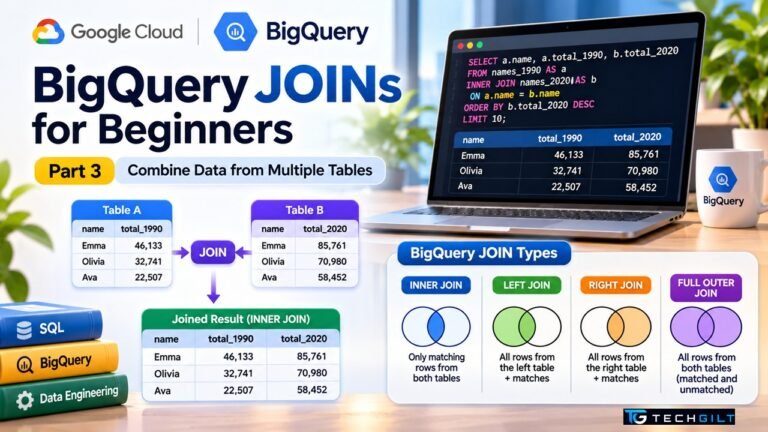
Learn how a BigQuery JOIN combines data from two tables, with INNER JOIN, LEFT JOIN and a lookup-table example you can run free in the BigQuery sandbox. Part 3 of our BigQuery series
In real data work, the answer you need is rarely sitting in one table. Sales are in one place, customers in another, and product details somewhere else. A JOIN is how SQL brings them together. In Part 1 of this series, we set up the free BigQuery sandbox, and in Part 2 we learned SELECT, WHERE, GROUP BY and HAVING. In this Part 3, you’ll learn how a BigQuery JOIN works, step by step, using a free public dataset and no credit card.
Quick Answer
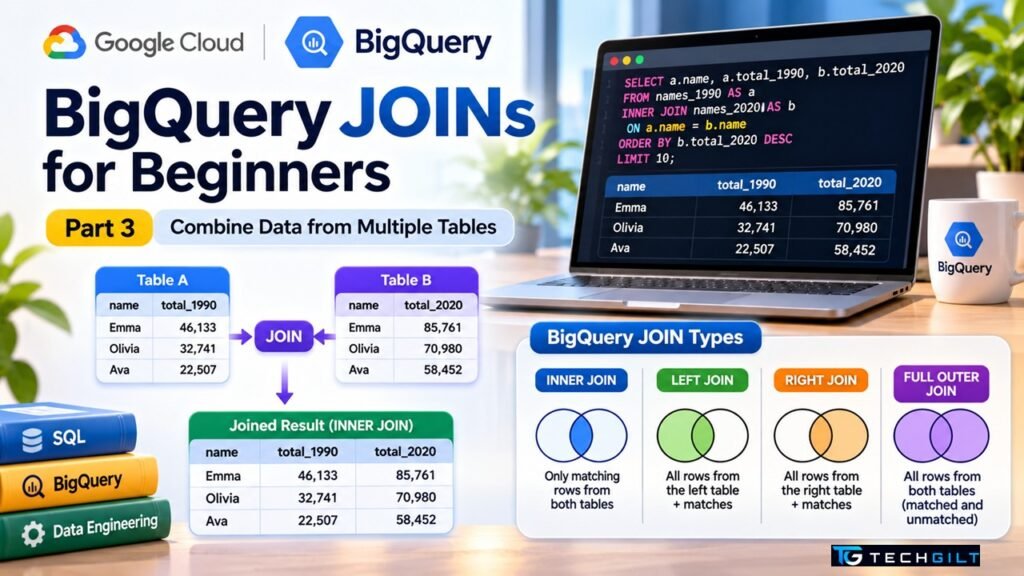
A BigQuery JOIN combines rows from two tables using a common column, called the join key. The most used types are:
- INNER JOIN: returns only rows that match in both tables.
- LEFT JOIN: returns all rows from the left table, plus matches from the right table (NULL where there’s no match).
- RIGHT JOIN and FULL OUTER JOIN: less common, covered briefly below.
The basic pattern is SELECT ... FROM table_a AS a JOIN table_b AS b ON a.key = b.key. You can practise every BigQuery JOIN type for free in the BigQuery sandbox.
What You Need
- A free BigQuery sandbox project (see Part 1 if you haven’t set it up yet)
- Basic SQL from Part 2: SELECT, WHERE, GROUP BY and ORDER BY
- About 20 minutes
We’ll use the same public dataset as before: bigquery-public-data.usa_names.usa_1910_current. It lists baby names registered in each US state by year, with the columns state, gender, year, name and number.
How a BigQuery JOIN Works
Think of two lists in Excel: one with employee IDs and names, another with employee IDs and salaries. To see names and salaries together, you’d use VLOOKUP on the employee ID. A BigQuery JOIN does the same thing, but for millions of rows and in seconds.
Every BigQuery JOIN needs three things:
- Two tables (or query results), one on the left and one on the right
- A join type (INNER, LEFT and so on)
- A join condition after
ON, saying which columns must match
Our dataset is a single table, so we’ll use WITH (also called a CTE, or common table expression) to create two small temporary tables from it, and then join them. This is a common pattern in real projects too.
Query 1: INNER JOIN, Names Popular in Both 1990 and 2020
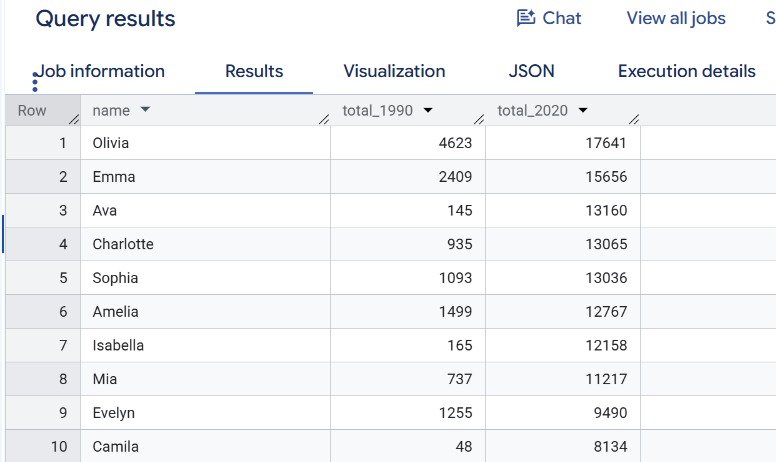
Let’s find girls’ names given in both 1990 and 2020, and compare how many babies got each name.
WITH names_1990 AS (
  SELECT name, SUM(number) AS total_1990
  FROM `bigquery-public-data.usa_names.usa_1910_current`
  WHERE year = 1990 AND gender = 'F'
  GROUP BY name
),
names_2020 AS (
  SELECT name, SUM(number) AS total_2020
  FROM `bigquery-public-data.usa_names.usa_1910_current`
  WHERE year = 2020 AND gender = 'F'
  GROUP BY name
)
SELECT
  a.name,
  a.total_1990,
  b.total_2020
FROM names_1990 AS a
INNER JOIN names_2020 AS b
  ON a.name = b.name
ORDER BY b.total_2020 DESC
LIMIT 10;
What’s happening:
names_1990andnames_2020are two temporary tables, each with one row per name.INNER JOIN ... ON a.name = b.namekeeps only names that appear in both years.aandbare aliases, short nicknames that tell BigQuery which table each column comes from.
Query 2: LEFT JOIN, Names From 1990 That Disappeared by 2020
Now the opposite question: which girls’ names were given in 1990 but not at all in 2020? This is where a LEFT JOIN helps.
WITH names_1990 AS (
  SELECT name, SUM(number) AS total_1990
  FROM `bigquery-public-data.usa_names.usa_1910_current`
  WHERE year = 1990 AND gender = 'F'
  GROUP BY name
),
names_2020 AS (
  SELECT name, SUM(number) AS total_2020
  FROM `bigquery-public-data.usa_names.usa_1910_current`
  WHERE year = 2020 AND gender = 'F'
  GROUP BY name
)
SELECT
  a.name,
  a.total_1990,
  b.total_2020
FROM names_1990 AS a
LEFT JOIN names_2020 AS b
  ON a.name = b.name
WHERE b.name IS NULL
ORDER BY a.total_1990 DESC
LIMIT 10;
What’s happening:
- A LEFT JOIN keeps every name from 1990, even if there’s no match in 2020.
- When there’s no match, the 2020 columns come back as NULL.
WHERE b.name IS NULLkeeps only those unmatched names, the ones that vanished.
This “LEFT JOIN + IS NULL” trick is one of the most useful BigQuery JOIN patterns in data engineering. Teams use it to find customers with no orders, records missing from a target table, or files that failed to load.
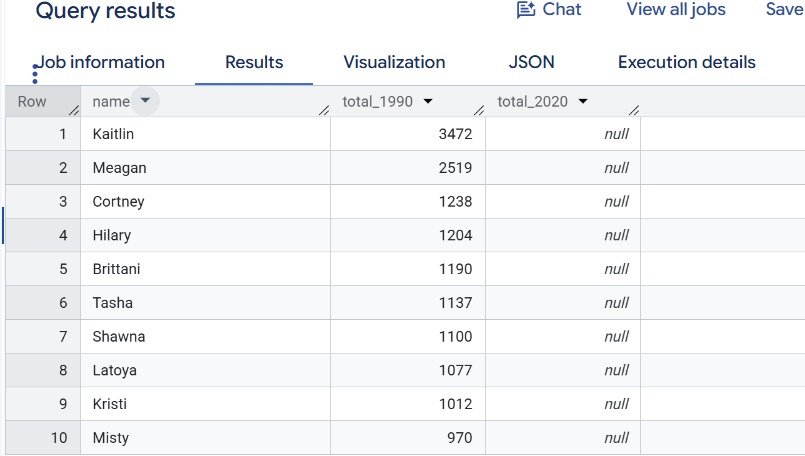
Note: the dataset only includes a name in a state if at least 5 babies got it that year, so “disappeared” means it fell below that level everywhere.
Query 3: JOIN With a Lookup Table
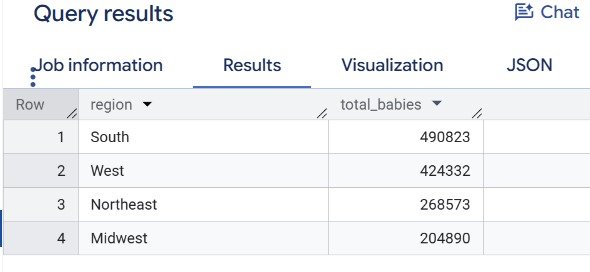
In real projects, you often join a large fact table (transactions, events) with a small lookup table (codes and their meanings). Let’s create a tiny lookup table that maps a few US states to their regions, then count babies born in 2020 by region.
WITH regions AS (
  SELECT 'CA' AS state, 'West' AS region UNION ALL
  SELECT 'WA', 'West' UNION ALL
  SELECT 'TX', 'South' UNION ALL
  SELECT 'FL', 'South' UNION ALL
  SELECT 'NY', 'Northeast' UNION ALL
  SELECT 'PA', 'Northeast' UNION ALL
  SELECT 'IL', 'Midwest' UNION ALL
  SELECT 'OH', 'Midwest'
)
SELECT
  r.region,
  SUM(n.number) AS total_babies
FROM `bigquery-public-data.usa_names.usa_1910_current` AS n
INNER JOIN regions AS r
  ON n.state = r.state
WHERE n.year = 2020
GROUP BY r.region
ORDER BY total_babies DESC;
What’s happening:
regionsis a small lookup table built withUNION ALL. In a real project, this would be a proper table in your dataset.- The INNER JOIN matches each baby-name row to its region using the state code.
GROUP BY r.regionthen adds up the totals per region, combining a BigQuery JOIN with what you learned in Part 2.
RIGHT JOIN and FULL OUTER JOIN in Brief
| JOIN type | Returns | When to use it |
|---|---|---|
| INNER JOIN | Only matching rows from both tables | Most everyday reports |
| LEFT JOIN | All rows from the left table, plus matches | Finding missing or unmatched records |
| RIGHT JOIN | All rows from the right table, plus matches | Rarely; swap the tables and use LEFT JOIN instead |
| FULL OUTER JOIN | All rows from both tables | Comparing two lists to see every difference |
| CROSS JOIN | Every row combined with every other row | Generating combinations; use with care |
Most data engineers write LEFT JOIN instead of RIGHT JOIN, because reading queries from left to right is easier. Google’s BigQuery JOIN documentation covers every type in detail.
Common BigQuery JOIN Mistakes
- Forgetting the ON condition. Without it, you may accidentally create a CROSS JOIN with millions of extra rows.
- Joining on non-unique keys. If the same name appears many times in both tables, rows multiply. That’s why we used GROUP BY to get one row per name before joining.
- Ambiguous column names. If both tables have a
namecolumn, always writea.nameorb.name. - Filtering a LEFT JOIN in the wrong place. A condition on the right table in WHERE can turn your LEFT JOIN into an INNER JOIN. Put such filters inside the CTE or the ON clause instead.
- Ignoring cost. Check the “This query will process…” message at the top right before running. Selecting only the columns you need keeps every BigQuery JOIN within the sandbox’s free monthly limit.
Practice Exercises
Try these on your own in the sandbox to master each BigQuery JOIN type:
- Change Query 1 to compare boys’ names (
gender = 'M') between 1980 and 2020. - Change Query 2 to find names that are new in 2020 (not given in 1990). Hint: swap which table is on the left.
- Add more states to the
regionstable in Query 3 and see how the totals change.
Frequently Asked Questions
What is a BigQuery JOIN?
A BigQuery JOIN combines rows from two tables using a matching column, such as a customer ID or name. It works like VLOOKUP in Excel, but at a much larger scale.
What is the difference between INNER JOIN and LEFT JOIN?
INNER JOIN returns only rows that match in both tables. LEFT JOIN returns every row from the left table, with NULL values where the right table has no match.
Can I practise BigQuery JOINs for free?
Yes. The BigQuery sandbox lets you query public datasets like usa_names without a credit card, within its free monthly limits.
Why does my JOIN return more rows than expected?
Usually because the join key isn’t unique in one or both tables, so each match is repeated. Aggregate with GROUP BY first, or check for duplicates in the key column.
What is a CTE in BigQuery?
A CTE (common table expression) is a temporary, named result created with WITH at the start of a query. It makes complex queries easier to read and lets you join query results like tables.
Conclusion
JOINs are where SQL starts to feel powerful. With an INNER JOIN, you can combine matching data from two tables. With a LEFT JOIN and IS NULL, you can find what’s missing. With a small lookup table, you can turn codes into meaningful groups. Every BigQuery JOIN follows the same pattern: two tables, a join type and an ON condition. Practise these three queries in your free sandbox, and you’ll be ready for Part 4, where we’ll look at BigQuery date functions.
My take: I believe understanding joins is a fundamental skill for anyone pursuing data analytics or data engineering. Since real-world data is rarely stored in a single table, knowing how to combine related datasets is essential. In this tutorial, I have explained inner joins, left joins and lookup tables through practical examples rather than complex theory. The LEFT JOIN with an IS NULL check is especially valuable, because finding missing records is a common data engineering task. Students should practise these queries regularly until they become second nature. I would like to conclude by saying: “SQL becomes truly powerful when you learn not just to retrieve data, but to connect the story hidden across tables.”
Over to You
Which JOIN type do you find most confusing? Ask in the comments, and I’ll cover it in a future part of this series.