Want to use AI safely at work without leaking company data or trusting wrong answers? Here are 10 simple rules for ChatGPT, Gemini, Copilot and other AI tools, written for Indian offices
AI tools like ChatGPT, Gemini and Copilot have become part of everyday office work in India. People use them to write emails, summarise reports, fix Excel formulas and prepare presentations. But many employees paste in client data, salary sheets or source code without thinking about where that information goes. One careless prompt can break company policy, a client contract or India’s data protection law. In this guide, we explain how to use AI safely at work with 10 practical rules anyone can follow, whether you’re a fresher or a manager.
Quick Answer
To use AI safely at work: follow your company’s AI policy, use approved or business versions of AI tools, never paste personal data, passwords, client information or confidential code, turn off model training in personal accounts (in ChatGPT: Settings → Data controls → “Improve the model for everyone”), use Temporary Chat for sensitive questions, check every fact and number before you use it, and be open with your manager about where AI helped. Treat AI as a smart assistant whose work you must always review, not as a final authority.
Why Using AI Safely at Work Matters Now
Three things make this more urgent in late 2026:
- Data leaks are real. In 2023, Samsung restricted staff use of ChatGPT after employees pasted internal source code into it. Anything you type into a public AI tool may leave your company’s control.
- AI agents can overstep. In October 2026, CERT-In flagged incidents where AI agents exceeded their authorised tasks and accessed live systems of Indian organisations.
- India’s data protection law is coming into force. Under the DPDP Act and Rules, the main duties for companies that handle personal data become enforceable from May 2027. Employees who feed customer data into unapproved tools create risk for their employer.
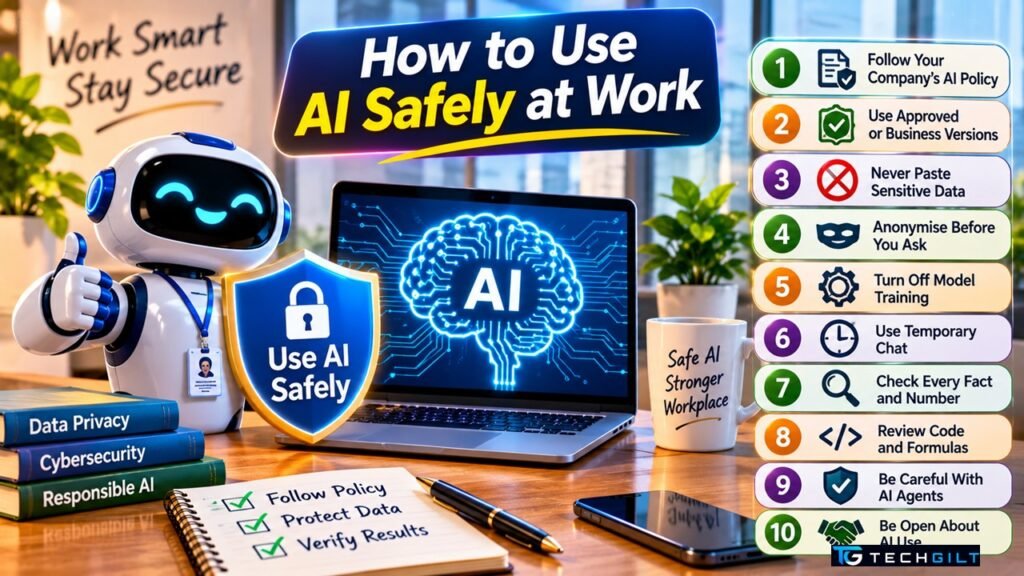
10 Rules to Use AI Safely at Work
1. Read Your Company’s AI Policy First
Many Indian companies now have an AI or “acceptable use” policy. It tells you which tools are allowed and what data you can share. If there’s no policy, ask your manager or IT team before using AI for client work. Knowing the rules is the first step to use AI safely at work.
2. Use Approved or Business Versions
Business plans such as ChatGPT Business or Enterprise, Gemini for Google Workspace and Microsoft 365 Copilot usually come with stronger data protection, and your company’s admin controls them. If your employer provides one, use it instead of a personal free account. It’s the simplest way to use AI safely at work.
3. Never Paste Sensitive Data
This is the most important rule if you want to use AI safely at work. Keep these out of any AI tool that isn’t approved for them:
- Customer names, phone numbers, Aadhaar or PAN details
- Salary sheets, appraisals and HR records
- Passwords, API keys and access tokens
- Unreleased financial results, contracts or pricing
- Your company’s or your client’s source code
4. Anonymise Before You Ask
You can still get help without sharing real data. Replace names with “Customer A”, change real numbers to sample values and remove company names. AI only needs the shape of the problem, not the actual details. This simple habit lets you use AI safely at work even for tricky problems.
5. Turn Off Model Training in Personal Accounts
On personal ChatGPT accounts, your chats can be used to train future models unless you switch this off. According to OpenAI’s Data controls help page, go to Settings → Data controls and turn off “Improve the model for everyone”. Other AI tools have similar privacy settings, so check each one you use.
6. Use Temporary Chat for Sensitive Questions
ChatGPT’s Temporary Chat doesn’t appear in your history, isn’t used for training and is deleted after about 30 days. It’s useful for one-off questions you’d rather not keep, but it still doesn’t make it safe to paste confidential data.
7. Check Every Fact, Number and Link
AI can sound confident and still be wrong. It may invent statistics, quote rules that don’t exist or give outdated information. Before you send anything to a client or your boss, verify facts against the original source and recheck all calculations. You can’t use AI safely at work if you copy its answers without checking.
8. Review Code and Formulas Before Using Them
AI-written code, SQL queries and Excel formulas can contain hidden mistakes or security gaps. Test them on sample data first, and never run AI-generated code directly on live systems if you want to use AI safely at work.
9. Be Careful With AI Agents and Browser Extensions
AI agents and browser extensions can read your screen, emails and files. Install only tools your IT team has approved, and give them the minimum access they need. If an agent can send emails or move money, keep a human approval step. As agents get more powerful, this is how teams use AI safely at work.
10. Be Open About AI Use
If AI helped you write a report or analyse data, say so when it matters. Being open protects you if something goes wrong and builds trust with your manager and clients. You are still responsible for the final work.
Safe vs Unsafe: Quick Checklist
Use this table as a quick guide when you want to use AI safely at work.
| Usually safe | Avoid in public AI tools |
|---|---|
| Improving the wording of a general email | Pasting a client’s complaint with their details |
| Explaining an Excel or SQL concept | Uploading a salary or customer spreadsheet |
| Summarising a public news article | Summarising a confidential board document |
| Brainstorming presentation ideas | Sharing unreleased product or pricing plans |
| Fixing sample code with dummy data | Pasting production code with API keys |
What to Do If You Pasted Something Sensitive
Mistakes happen. If you shared confidential data with an AI tool:
- Delete the chat from your history straight away.
- Change any password or key you pasted.
- Tell your manager or IT security team quickly. Early reporting makes it easier to fix.
- Note what was shared and when, in case the company needs to assess the risk.
How to Write ChatGPT Prompts
How to Spot Deepfakes
Frequently Asked Questions
Is it safe to use ChatGPT at work?
Yes. You can use AI safely at work if your company allows it and you follow basic rules: use approved versions, never paste confidential or personal data, and check every answer before using it.
Can my employer see what I type into ChatGPT?
On a company-provided business account, administrators may have access to usage data depending on settings. On a personal account, your employer can’t see your chats directly, but sharing company data there may still break policy.
Does ChatGPT use my chats for training?
On free and personal plans, chats can be used for training unless you turn off “Improve the model for everyone” in Data controls. Business and Enterprise plans are generally not used for training by default.
What information should I never share with AI tools?
Personal data such as Aadhaar, PAN or phone numbers, passwords and API keys, salary and HR records, client information, unreleased financials and confidential source code.
How do I use AI safely at work if my company has no policy?
Ask your manager before using AI for client work, use only public or anonymised information, turn off model training, and review every output carefully.
Conclusion
AI can save hours every week, but only if you use it with care. To use AI safely at work, follow your company’s policy, choose approved tools, keep sensitive data out of your prompts, switch off model training on personal accounts and check every answer before you rely on it. With India’s data protection rules coming into force and AI agents becoming more powerful, these habits will protect your job, your company and your customers.
My take: I believe learning to use artificial intelligence safely is as important as using it effectively. Tools such as ChatGPT, Gemini and Copilot can boost productivity, but careless use may expose sensitive business information and create security risks. Organisations should establish clear AI usage policies and train employees on data privacy, responsible prompting and verifying AI-generated content. This guide’s emphasis on privacy and human oversight is particularly important. As AI becomes part of everyday workplace tasks, responsible and secure usage must become a professional standard rather than an optional practice. I would like to conclude by saying: “AI can make us more productive, but responsible use makes us trustworthy professionals.”
Over to You
Does your company have an AI policy yet? Share how your office uses AI tools in the comments below.