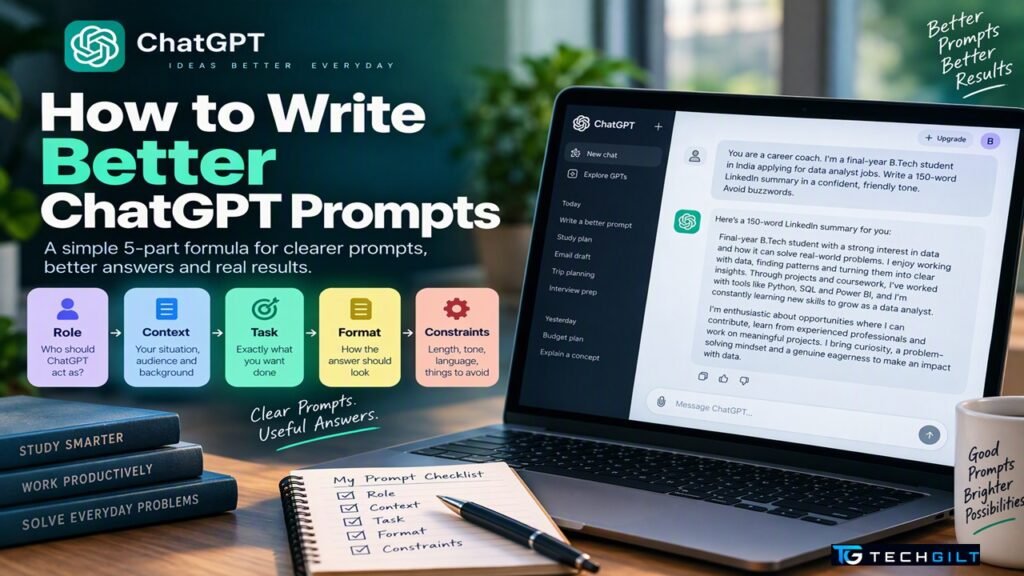
A simple 5-part formula for writing better ChatGPT prompts, with before-and-after examples and 10 ready-to-use prompts for students, professionals and everyday tasks
Two people can ask ChatGPT the same question and get very different answers. The difference is rarely the AI; it’s the prompt. A vague request like “write about cloud computing” gets a generic essay, while a clear prompt with context, a goal and a format gets something you can actually use. The good news is that writing better ChatGPT prompts is a skill anyone can learn in minutes. In this guide, we share a simple formula, before-and-after examples, common mistakes to avoid and 10 ready-to-use ChatGPT prompts you can copy today.
Quick Answer
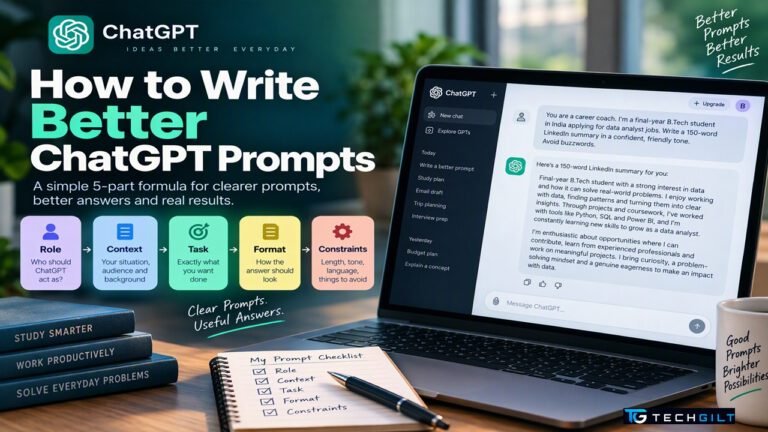
The best ChatGPT prompts include five parts: Role (who ChatGPT should act as), Context (your situation and audience), Task (exactly what you want), Format (how the answer should look) and Constraints (length, tone, what to avoid). For example: “You are a career coach. I’m a final-year B.Tech student in India applying for data analyst jobs. Write a 150-word LinkedIn summary in a confident, friendly tone. Avoid buzzwords.” Then refine: review the answer and ask for changes. OpenAI’s own guidance stresses being clear and specific, giving examples and improving the prompt step by step.
Why Your ChatGPT Prompts Matter
ChatGPT doesn’t know your situation unless you tell it. Without context, it fills the gaps with generic assumptions. According to OpenAI’s Help Center, the most important prompting habits are to be clear and specific, refine your prompt step by step and ask for the tone you want.
Good ChatGPT prompts save time, reduce back-and-forth and give answers that fit your real need, whether you’re a student preparing for exams, a professional writing emails or a parent planning a budget.
The 5-Part Formula for Better ChatGPT Prompts (R-C-T-F-C)
| Part | What to include | Example |
|---|---|---|
| 1. Role | Who should ChatGPT act as? | “You are an experienced cloud trainer…” |
| 2. Context | Your situation, audience and background | “…teaching beginners with no coding experience…” |
| 3. Task | Exactly what you want done | “…explain what BigQuery is…” |
| 4. Format | How the answer should look | “…in 5 bullet points, followed by one real-life example…” |
| 5. Constraints | Length, tone, language, things to avoid | “…under 150 words, simple English, no jargon.” |
You don’t need all five every time, but the more you include, the better the result.
Before and After: See the Difference
Example 1: Learning a topic
- ❌ Weak: “Explain machine learning.”
- ✅ Better: “You are a patient teacher. Explain machine learning to a Class 11 student who knows basic maths. Use one everyday Indian example, such as how a food delivery app predicts delivery time. Keep it under 200 words.”
Example 2: Writing an email
- ❌ Weak: “Write a leave email.”
- ✅ Better: “Write a polite email to my manager asking for 3 days’ leave from 4 to 6 November for a family function. Mention that I’ll complete the sprint review before leaving and that Rahul will cover urgent issues. Keep it under 120 words and professional.”
Example 3: Getting career help
- ❌ Weak: “How do I become a data engineer?”
- ✅ Better: “You are a senior data engineering mentor. I’m a 2-year Java developer in Bengaluru wanting to move into data engineering on Google Cloud. Create a 12-week learning plan with weekly goals, free resources and one hands-on project per month. Present it as a table.”
8 Tips to Improve Your ChatGPT Prompts
These tips combine OpenAI’s guidance, including tips reported by KuCoin News, with practical experience:
- Put the main instruction first. Then give supporting details or paste your text, separated with symbols like
###or""". - Be specific about the output. Say the length, format (table, bullets, steps) and style you want.
- Replace vague words with numbers. Instead of “keep it short”, say “in 3 sentences” or “under 100 words”.
- Give an example. Show a sample of the format or style you like, and ChatGPT will follow it.
- Say what to do, not only what to avoid. “Use simple English” works better than just “don’t use jargon”.
- Ask for a specific tone. Formal, friendly, persuasive or humorous, as OpenAI suggests.
- Refine, don’t restart. Follow up with “make it shorter”, “add an example” or “rewrite for a beginner”.
- Ask ChatGPT to ask you questions. End with “Ask me any questions you need before you start.” This often produces much better results.
10 Ready-to-Use ChatGPT Prompts
Copy these ChatGPT prompts and replace the parts in [brackets]:
For students
- Exam revision: “Create 10 multiple-choice questions on [topic] for [class/exam], with answers and a one-line explanation for each.”
- Simplify a concept: “Explain [concept] as if I’m a beginner, using one everyday example from India. Then give me 3 questions to check my understanding.”
- Study plan: “Make a [number]-week study plan for [exam], studying [hours] a day, with weekly goals and revision days.”
For professionals
4. Email: “Write a [polite/firm/friendly] email to [person] about [situation]. Key points: [points]. Under [number] words.”
5. Meeting summary: “Summarise these meeting notes into: key decisions, action items with owners, and open questions. ### [paste notes] ###”
6. Interview preparation: “You are an interviewer for a [role] at a [type of company]. Ask me 5 interview questions one at a time, and give feedback on each answer.”
7. Resume improvement: “Rewrite these resume points to highlight measurable impact, using action verbs. ### [paste points] ###”
For everyday life
8. Monthly budget: “Help me create a monthly budget for a family of [number] in [city] with a take-home income of ₹[amount]. Show it as a table with savings goals.”
9. Trip planning: “Plan a [number]-day trip to [place] in [month] for [who] with a budget of ₹[amount], including travel, stay and must-see places.”
10. Spot scams: “Here is a message I received. Tell me whether it shows signs of a scam and why. ### [paste message] ###”
Common Mistakes to Avoid
- Being too vague: one-line ChatGPT prompts get generic answers.
- Asking for too much at once: split big tasks into steps.
- Trusting answers blindly: AI can be confidently wrong, so always check facts, figures and dates, especially for exams, health, legal or financial decisions.
- Sharing private data: never paste Aadhaar, PAN, bank details, passwords, OTPs or confidential office documents into any AI tool.
- Giving up too early: if the first answer isn’t right, refine your prompt instead of starting over.
Also read: Free AI Tools for Students
Frequently Asked Questions
What makes good ChatGPT prompts?
Good ChatGPT prompts are clear and specific, and include a role, context, the exact task, the output format and any constraints such as length or tone.
Do I need to learn “prompt engineering” to use ChatGPT well?
No. Using a simple structure like Role, Context, Task, Format and Constraints, and refining the answer step by step, is enough for most people.
Can I write ChatGPT prompts in Hindi or other Indian languages?
Yes. ChatGPT understands many Indian languages. You can also ask it to reply in simple English or in your preferred language.
Should I use the same prompt for Gemini or Claude?
Yes. The same principles of clarity, context and format work well across most AI assistants.
Is it safe to share personal information in ChatGPT prompts?
Avoid sharing sensitive personal, financial or confidential work information in any AI tool.
Conclusion
Writing better ChatGPT prompts doesn’t require technical skills, just clarity. Tell ChatGPT who to be, give it context, state the task, specify the format and add constraints, then refine the answer step by step. Use the 10 ready-made ChatGPT prompts in this guide as a starting point, avoid sharing private data, and always verify important facts. With a little practice, ChatGPT can become a genuinely useful study partner, writing assistant and everyday helper.
My take: I believe learning to write effective ChatGPT prompts is becoming an essential digital skill, much like learning to search the internet or use office software. The real value of AI lies not in asking more questions, but in clearly explaining what we want to achieve. A well-structured prompt gives the necessary context, defines the task, specifies the format and sets practical boundaries. This is especially valuable for students, educators and professionals who want to save time and improve the quality of their work.
I suggest starting with a simple prompt, studying the response and refining it step by step until it meets your needs. Also remember that AI is an assistant, not an infallible authority: always verify critical information and keep sensitive data private. Ultimately, those who learn to communicate clearly with AI will be better placed to use it both productively and responsibly. I would conclude by saying: “AI can give you answers, but a well-crafted prompt helps you get the answers you actually need.”
Over to You
What’s the most useful prompt you’ve ever used with ChatGPT? Share it in the comments to help other readers.