What AWS, Microsoft Azure and Google Cloud really give you for free in 2026, and which one suits beginners, students and professionals
Every major cloud provider offers a cloud free tier, but the offers are very different, and the fine print matters. One gives you more credit, another gives you more time, and some services stay free forever while others quietly expire. If you’re a student, a working professional learning cloud, or someone preparing for a certification, choosing the right free tier can save you money and frustration. Here’s a clear, side-by-side comparison of what AWS, Azure and Google Cloud offer today.
Quick Answer
All three providers combine free credits with services that stay free within monthly limits:
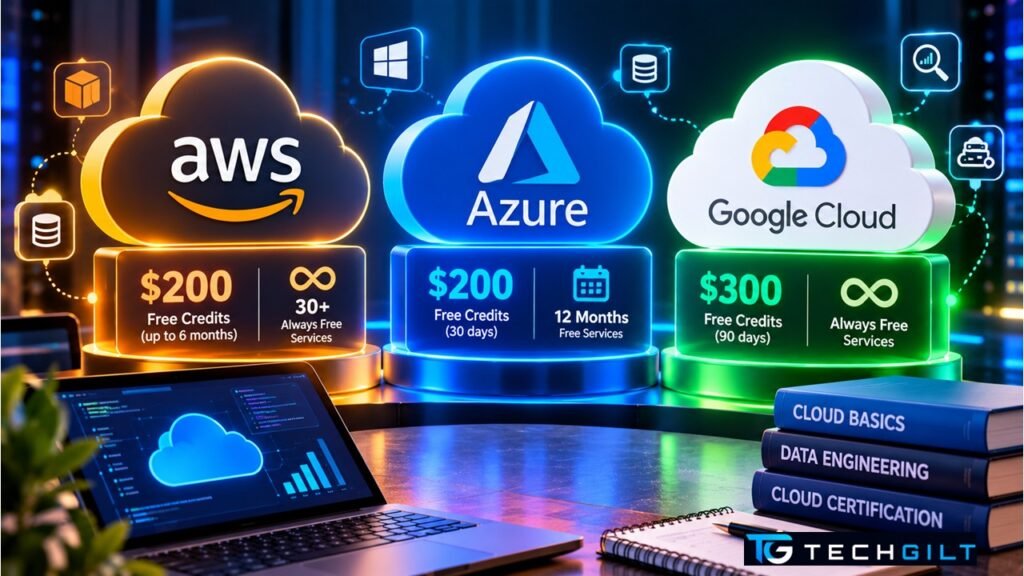
- AWS: up to $200 in credits ($100 at sign-up, plus up to $100 more by completing activities) on a free plan that lasts 6 months, plus 30+ always-free services.
- Microsoft Azure: $200 in credit for 30 days, plus 12 months of popular free services and a set of always-free services.
- Google Cloud: $300 in credit for 90 days, plus an Always Free tier with monthly limits, such as one small VM and 1 TB of BigQuery queries.
All three ask for a payment method at sign-up, mainly for identity verification.
Cloud Free Tier Comparison at a Glance
| Feature | AWS | Microsoft Azure | Google Cloud |
|---|---|---|---|
| Free credit | Up to $200 | $200 | $300 |
| Credit validity | Up to 6 months (free plan) | 30 days | 90 days |
| Time-limited free services | Covered by the free plan and credits | 12 months of popular services | No separate 12-month tier |
| Always-free services | 30+ | Yes, with monthly limits | Yes, with monthly limits |
| Payment method at sign-up | Required | Required | Required |
| No-card option | AWS Educate (learning content only) | Azure for Students (verified students) | BigQuery sandbox (BigQuery only) |
AWS Free Tier: Credits and a 6-Month Free Plan
AWS changed its cloud free tier in July 2025. New customers now choose a free account plan at sign-up and get $100 in credits straight away. They can earn up to $100 more by trying services such as Amazon EC2 and Amazon Bedrock, for a total of up to $200. The credits work across more than 200 services.
The free plan ends 6 months after sign-up or when the credits run out, whichever comes first. You can upgrade to a paid plan with one click at any time. More than 30 services remain always free within their monthly limits. These details come from AWS’s official announcement.
Best for: people who want to explore many services at a relaxed pace, since 6 months is the longest credit window of the three.
Microsoft Azure Free Account: $200 for 30 Days, Then 12 Months Free
Azure gives new users $200 in credit to use within 30 days. That’s generous, but the clock is short, so plan your experiments before you sign up.
After the credit period, you can keep using 12 months of popular services for free, within limits. Examples include:
- 750 hours a month of a B1s virtual machine (Linux or Windows), roughly one small VM running all month
- Azure SQL Database storage
- Blob Storage and Azure Files
- Some outbound data transfer
A set of always-free services, such as Azure Functions and Azure DevOps, continues beyond the first year within monthly limits.
Important: once the 30-day credit period ends, pay-as-you-go resources are suspended unless you upgrade. If you don’t upgrade within the grace period, they can be deleted, including their data.
Best for: people who want to build and run a small project over a full year, especially on Microsoft technologies.
Google Cloud Free Program: $300 for 90 Days, Plus Always Free
Google Cloud offers the largest credit: a $300 welcome credit for 90 days for new customers. You’re not billed during the trial. If you don’t upgrade, the trial account closes when the credit or the 90 days run out, followed by a 30-day grace period before resources are deleted.
Google’s Free Tier has no end date. Its monthly limits include:
- Compute Engine: one e2-micro VM in selected US regions, with 30 GB of standard disk
- Cloud Storage: 5 GB of regional storage in US regions
- BigQuery: 1 TB of queries and 10 GB of storage
- Cloud Run: 2 million requests
- Cloud Functions: 2 million invocations
These limits are listed in Google Cloud’s official free features page. Google also offers the BigQuery sandbox, which needs no payment method at all, but it covers only BigQuery.
Best for: data and analytics learners. The BigQuery free allowance is among the most useful always-free offers for practising SQL on real datasets.
Which Cloud Free Tier Should You Choose?
| If you are… | Start with | Why |
|---|---|---|
| A complete beginner exploring cloud | AWS | Longest window (6 months) to learn at your own pace |
| Learning data analytics or SQL | Google Cloud | $300 credit plus BigQuery’s generous always-free allowance |
| Building a small app over a year | Azure | 12 months of popular free services after the credit |
| A student without a credit card | Azure for Students | Credit for verified students with no card required, per Microsoft |
| Preparing for a certification | The provider you’re certifying in | Hands-on practice on the real console matters most |
There’s no rule that you can only pick one. Many learners start with one provider, then use the others’ credits later to compare services side by side.
How to Avoid Surprise Bills on Any Cloud Free Tier
Free tiers are generous, but beginners still get unexpected bills. These habits protect you:
- Set a budget alert on day one. All three providers let you get an email when spending crosses a threshold, even a very low one.
- Delete resources when you finish an experiment. A forgotten VM or database is the most common cause of surprise charges.
- Check the region. Some always-free limits apply only to specific regions, for example certain US regions on Google Cloud.
- Watch data transfer. Sending data out of the cloud (egress) often has smaller free limits than compute or storage.
- Read the expiry dates. Credits expire, and time-limited free services end after their period, even if you haven’t used them.
Also read: How to Use BigQuery for Free
Frequently Asked Questions
Which cloud free tier is the best?
It depends on your goal. Google Cloud gives the largest credit ($300), AWS gives the longest credit window (6 months), and Azure adds 12 months of free popular services. For data and SQL learning, Google Cloud’s BigQuery allowance stands out.
Do I need a credit card for a cloud free tier?
Yes, for the standard free offers from AWS, Azure and Google Cloud, mainly for identity verification. Exceptions include Google’s BigQuery sandbox and Azure for Students, which don’t require a card.
Will I be charged automatically when my free credit ends?
Not usually. All three providers say you must upgrade to a paid plan before regular billing starts. However, resources may be suspended or deleted if you don’t upgrade, so back up anything important.
Can I use free tiers from all three providers at the same time?
Yes. Each provider’s free offer is separate, so you can sign up for all three and compare them.
Are cloud free tier limits the same in India?
The core offers are global, but some always-free limits apply only in specific regions, which may not be in India. Check each service’s region rules before you deploy.
Conclusion
Each cloud free tier has a different strength: AWS gives you the most time, Google Cloud the biggest credit plus strong always-free data services, and Azure a full year of popular services. Whichever you choose, set a budget alert, clean up after every experiment, and treat the free tier as a learning lab rather than a hosting plan. Free-tier offers change from time to time, so always confirm the current terms on the provider’s official page before you sign up.
My take: As a trainer, I usually recommend Google Cloud to anyone who wants to learn cloud data engineering, analytics or SQL. The reason is simple: the $300 credit lets new learners practise hands-on labs across Google Cloud, and on top of that, BigQuery gives them up to 1 TB of free queries every month. That’s plenty of room to practise what they’re learning.
That said, I make one rule mandatory from day one: set a budget alert. I also tell trainees to check the region and to delete every resource they create in the console as soon as a lab is finished. Every running resource has a cost, and if it isn’t shut down, the $300 credit disappears surprisingly fast. In my trainings, I’ve seen beginners use up their entire credit simply because they forgot to stop their resources. Some assume that closing the browser window shuts everything down, but it doesn’t: you have to stop or delete resources manually. Apart from that one habit to build, Google Cloud is the best place to start learning.
Over to You
Which cloud free tier have you tried, AWS, Azure or Google Cloud, and what did you build with it? Share your thoughts in the comments below.