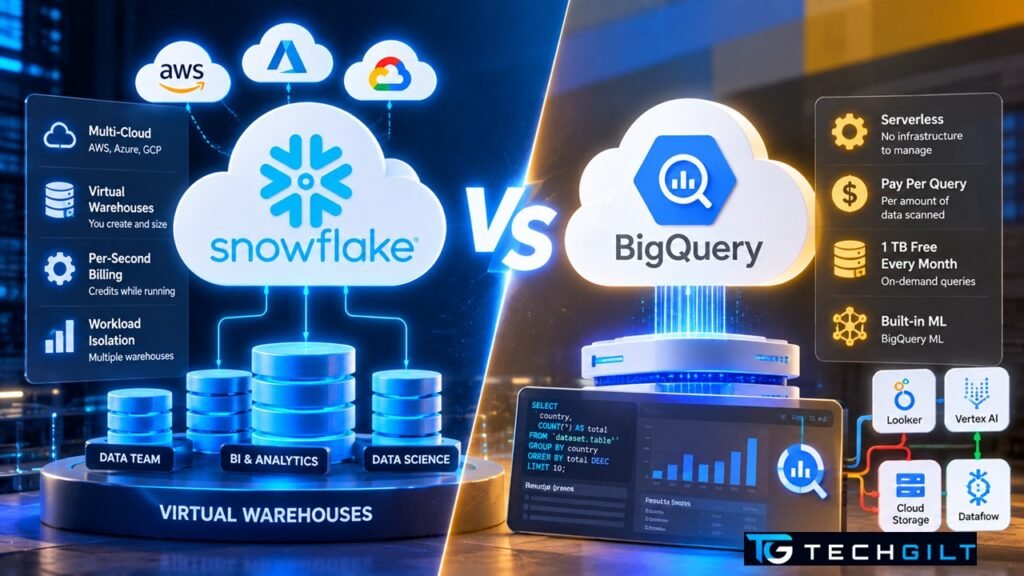
How the two most popular cloud data warehouses compare on architecture, pricing, features and fit, and how to choose between them
Snowflake vs BigQuery is one of the most common debates in data engineering. Both are fully managed cloud data warehouses, both run standard SQL over huge datasets in seconds, and both separate storage from compute. Yet they’re built on very different ideas, especially around how you pay and how much you control. If you’re choosing a platform for a project, or deciding which one to learn first, this guide explains the real differences in plain terms.
Quick Answer
BigQuery is Google Cloud’s serverless data warehouse: there are no clusters to size, and by default you pay per amount of data your queries scan. Snowflake is a multi-cloud data warehouse that runs on AWS, Azure or Google Cloud: you run queries on virtual warehouses (compute clusters) that you size and that are billed per second while running. Choose BigQuery if you’re on Google Cloud and want zero infrastructure management. Choose Snowflake if you need multi-cloud flexibility or want predictable, workload-by-workload control over compute.
What Is BigQuery?
BigQuery is Google Cloud’s fully managed, serverless data warehouse. You load data and write SQL; Google decides how much computing power each query needs and allocates it automatically. Compute is measured in slots (virtual CPUs), but on the default on-demand model you never manage them yourself.
BigQuery is tightly integrated with the rest of Google Cloud, including Cloud Storage, Dataflow, Pub/Sub, Looker and Vertex AI, and it lets you build machine-learning models directly in SQL with BigQuery ML.
What Is Snowflake?
Snowflake is an independent cloud data platform that runs on top of AWS, Microsoft Azure or Google Cloud; you pick the cloud and region when you create an account. Its defining feature is the virtual warehouse: a compute cluster you create in a chosen size (X-Small, Small, Medium and so on), start, stop and resize at will.
Multiple warehouses can work on the same data at the same time without slowing each other down, so the data team, the BI dashboards and the data-science team can each have their own compute.
Snowflake vs BigQuery at a Glance
| Feature | BigQuery | Snowflake |
|---|---|---|
| Provider | Google Cloud | Snowflake (runs on AWS, Azure or Google Cloud) |
| Architecture | Serverless; Google allocates compute (slots) | Virtual warehouses you create and size |
| Storage and compute | Separate | Separate |
| Default pricing model | On-demand: per TiB of data scanned | Per-second credits while a warehouse runs |
| Alternative pricing | Capacity pricing (editions, billed per slot-hour) | Editions with different credit prices |
| Infrastructure to manage | Almost none | Warehouse sizing, auto-suspend settings |
| Multi-cloud | Google Cloud (plus BigQuery Omni for some cross-cloud data) | Yes, AWS, Azure and Google Cloud |
| Free way to start | BigQuery sandbox (no credit card) | Free trial |
| Built-in ML | BigQuery ML | Snowpark and Snowflake’s AI features |
Snowflake vs BigQuery Architecture: Serverless vs Virtual Warehouses
In the Snowflake vs BigQuery comparison, this is the biggest practical difference.
BigQuery is truly serverless. There’s nothing to start, stop or size. You run a query and BigQuery scales up behind the scenes. That makes it ideal for teams that don’t want to think about infrastructure, and for unpredictable, ad-hoc analysis.
Snowflake gives you control. You decide how big each virtual warehouse is, and each step up in size roughly doubles both the computing power and the credits billed per hour. Warehouses can auto-suspend when idle and auto-resume when a query arrives, and a suspended warehouse uses no credits. This model lets you isolate workloads, for example a small warehouse for dashboards and a large one for nightly data loads.
Snowflake vs BigQuery Pricing: How You Pay
Pricing is where the two differ most, and where most cost surprises come from.
BigQuery pricing
- On-demand (default): you pay per TiB of data your queries scan. In the US multi-region, this is $6.25 per TiB, and the first 1 TiB each month is free, according to Google Cloud’s BigQuery pricing page.
- Capacity pricing: instead of paying per query, you buy compute as slots, billed per slot-hour, through the Standard, Enterprise or Enterprise Plus editions. This suits heavy, predictable workloads.
- Storage: billed per GiB, and data that hasn’t been modified for 90 days drops to a cheaper long-term storage rate automatically.
The key cost habit in BigQuery is controlling how much data each query scans: select only the columns you need, and use partitioned and clustered tables.
Snowflake pricing
- Compute: you pay in credits while a virtual warehouse is running. Billing is per second, with a one-minute minimum each time a warehouse starts or resumes, as explained in Snowflake’s documentation on compute costs.
- Credit price: depends on your edition, cloud provider and region.
- Storage: billed separately, per amount of data stored each month.
The key cost habit in Snowflake is auto-suspend: a warehouse left running when no one is using it keeps consuming credits.
Snowflake vs BigQuery: Key Features Compared
Where BigQuery stands out:
- Zero administration: no warehouses, clusters or indexes to manage.
- BigQuery ML: create and run machine-learning models using SQL.
- Deep Google Cloud integration: streaming from Pub/Sub, pipelines with Dataflow, dashboards with Looker.
- Free learning path: the BigQuery sandbox needs no credit card.
Where Snowflake stands out:
- Multi-cloud: the same platform on AWS, Azure and Google Cloud, useful for companies spread across clouds.
- Workload isolation: separate warehouses mean one heavy job doesn’t slow down another team’s dashboards.
- Time Travel and zero-copy cloning: query data as it was in the past, and create instant copies of databases for testing without duplicating storage.
- Secure data sharing: share live data with other Snowflake accounts without copying it.
Snowflake vs BigQuery: Which Should You Choose?
| Your situation | Better fit | Why |
|---|---|---|
| Already on Google Cloud | BigQuery | Native integration and no extra vendor |
| Want zero infrastructure to manage | BigQuery | Fully serverless |
| Spiky, unpredictable ad-hoc queries | BigQuery | On-demand pricing scales with use |
| Using AWS or Azure, or several clouds | Snowflake | Runs on all three |
| Many teams needing isolated compute | Snowflake | Separate virtual warehouses |
| Need predictable compute costs per workload | Snowflake | You choose warehouse sizes and run times |
| Learning on a zero budget | BigQuery | Sandbox with no credit card |
For your career, the Snowflake vs BigQuery question doesn’t have to be either/or: learning both is a strong advantage. The core skill, writing efficient SQL over large datasets, transfers directly between them, and many companies use one or the other, sometimes both. To practise without spending money, start with the free cloud options compared in our AWS vs Azure vs GCP Free Tier guide.
Also read: How to Create an Amazon S3 Bucket
Also read: What Is a Data Lakehouse?
Frequently Asked Questions
Is Snowflake better than BigQuery?
In the Snowflake vs BigQuery debate, neither is better overall. BigQuery is simpler and serverless, and fits best on Google Cloud. Snowflake offers more control over compute and runs on multiple clouds. The right choice depends on your cloud, workloads and team.
Which is cheaper, Snowflake or BigQuery?
In a Snowflake vs BigQuery cost comparison, it depends on usage. BigQuery’s on-demand model is cheap for occasional queries but grows with the data scanned. Snowflake costs depend on warehouse size and running time. Poorly written queries or warehouses left running are the biggest cost risks on each.
Can Snowflake run on Google Cloud?
Yes. Snowflake runs on AWS, Microsoft Azure and Google Cloud; you choose the cloud and region when you create your account.
Do both Snowflake and BigQuery use SQL?
Yes. Both use SQL, with small differences in functions and syntax. Skills transfer easily between them.
Which should I learn first?
If you’re on a zero budget, start with BigQuery using the free sandbox. If your target employers use AWS or Azure, Snowflake is a valuable skill as well.
Conclusion
Snowflake vs BigQuery isn’t about which is more powerful; both handle petabyte-scale analytics with ease. The real difference is philosophy: BigQuery hides infrastructure completely and charges mainly by data scanned, while Snowflake gives you control over compute through virtual warehouses and runs on any major cloud. Match the platform to your cloud strategy and workloads, and keep an eye on the one habit that controls cost on each: scanned data in BigQuery, running warehouses in Snowflake.
My take: When I’m working on a project in Google Cloud and need to analyse data and extract insights from it, BigQuery is the tool I reach for most often. Snowflake, on the other hand, is a great choice for very large projects where controlling costs and workloads is essential. One of its key advantages is that it lets you scale compute separately for different teams, so one team’s heavy queries won’t affect another team or slow down the system.
I always tell my students that neither tool is better in every situation; the right choice depends on the project. BigQuery shines for fast analysis with no setup, while Snowflake excels at managing large business workloads with fine-grained control over compute. Knowing both is a real advantage, because the same SQL skills work on each, and many companies use both tools side by side.
Over to You
Have you worked with Snowflake, BigQuery or both, and which do you prefer for your projects? Share your thoughts in the comments below.